Note: This is "an english post version" of the slides I presented at the Mindcamp 3.0 event. It has some differences as the slides have to be condensed, but the content is mostly the same.
Wordpress is without any doubt the most used blogging platform on the net right now. It has a historial of both appraisals and bad feedback about being sometimes buggy or insecure, but the third version seems to be more at least more stable. As I have been working with PHP for more than two years, I decided it was time to start checking some "decent" source codes and see if things have improved from the terrible PHPNuke/PostNuke I knew years ago.
I decided to go for building a small caching component to speed up loading times of a small wordpress blog I have mostly for experimentation.
Wordpress has a nice documentation hub, being specially critical (at least for newcomers like me) the function reference list.
To assest how well (or wrongly) built Wordpress is, and in order to make my cache system as clean as possible, I decided to follow this restrictions:
* I had to break this rule once to get the post Id for the single-page template, and I only found the solution via searching the net and finding this magic lines:
global $wp_query;
$postID = $wp_query->post->ID;
The main idea behind any typical cache layer is to avoid touching the real data layer (usually the database), so I will show how to do the caching of a Page reducing the number of DB queries to as much as 2 one row queries (one to check for a cached version of content, optional second one to set/update that cached content).
To keep the DB as small as possible I will cache almost all the generated HTML content in a physical file.
I decided to cache specific pages (quite easy as in my blog I don't have comments in them), the homepage (a must, landing page should be as fast as possible) and the sidebar's "recent posts" fragment. This way I have three different scenarios (special page, pages by Id and a DB query).
Adapting this to the homepage, to a Post or to partial sections (for example the "recent posts" section on a sidebar) is trivial.
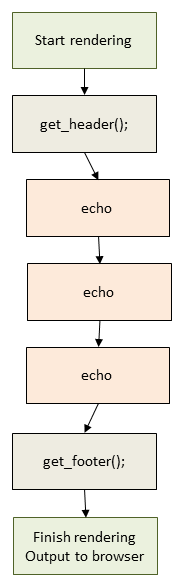
After some basic research, this is how Wordpress renders any non-administration page:
The huge design FAIL here are those echos. Wordpress assumes so much that you're going to "just render the page" that it works by "rendering" everything directly to the output buffer. So we cannot fine-control that output (and I definetly not want to cache the whole HTML generated, I want to decide what and whatnot).
Compare it with this approach:
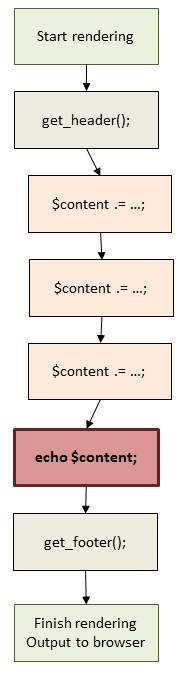
Here, everything writes to a "buffer" (a simple string variable), and then when we're finished, we just echo/output. This is much more extensible: Wanna filter certain things for mobile browsers? no problem; wanna build a web service-like architecture and return "preview" views? no problem either...
And what matters to us now: caching the $content variable equals to caching all the heavy part of the rendering.
We know what we want to cache (we'll come to some implementation caveats later), now let's see and build it:
I will use just one query to the database, by using Wordpress update_option() and get_option() to insert and check the cache keys.
I will use file storage for storing the cache values (simple HTML dumps). In memory (memcached like) would be faster, but still is way faster to read and output one file than parse multiple PHP files, access the DB, etcetera.
I will support sub-keys like this syntax: array( key => timestamp)
And the code should work like this:
$cache->Get(Kache::CACHE_KEY_PAGES, $postID);
$cache->Set(Kache::CACHE_KEY_PAGES, $content, $postID);
Basic methods are pretty easy:
public function Refresh($cacheKey) {
update_option($cacheKey, time());
}
public function Invalidate($cacheKey) {
update_option($cacheKey, false);
}
public function Set($cacheKey, $cacheContent, $arrayKey = null) {
if ($this->StoreContents($cacheKey, $cacheContent, $arrayKey)) {
$this->Refresh($cacheKey);
}
}
I won't go into details, but StoreContents() is the nexus cached data storage, so would be trivial to change my idea of saving to plain files to use memcached or any other system.
The Get() method is responsible for checking cache expiration times so has a bit more of logic:
public function Get($cacheKey, $arrayKey = null) {
$content = false;
$lastTime = get_option($cacheKey);
if ($lastTime) {
if (!self::$keysConfig[$cacheKey][0]) {
$lastTime = (int) $lastTime;
if (time() - $lastTime <= self::$keysConfig[$cacheKey][1]) {
$content = $this->GrabContents($cacheKey);
}
} else {
// Cast to array of key=>value
...
}
}
return $content;
}
Once again, GrabContents() reads from file the cached content and could be modified easily.
One problem that I found, and one of my main reasons to hate Wordpress, is it's shitty and non object-oriented design, which forced me to do this ugly methods to be able to plug them as hooks:
function InvalidatePages()
{
$cache = Kache::GetInstance(); //
$cache->Invalidate(Kache::CACHE_KEY_PAGES);
}
function InvalidateAll()
{
$cache = Kache::GetInstance();
$cache->InvalidateAll();
}
add_action ('publish_post', 'InvalidateAll');
add_action ('deleted_post', 'InvalidateAll');
add_action ('post_updated', 'InvalidateAll');
add_action ('comment_post', 'InvalidatePages');
add_action ('deleted_comment', 'InvalidatePages');
Everything is done, except modifying the theme to output to a $content variable (the diagram above, remember?). This is the worst part of this caching solution, as it is not optimal, but as I restrained myself to only themes and plugins I didn't had any other choice than to modify the themes page.php file:
$cache = Kache::GetInstance();
$content = $cache->Get(Kache::CACHE_KEY_PAGES, $postID);
if (!$content)
{
// Store everything
$content = '';
$content .= '<div id="container"><div id="main">';
...
}
// Always output content, either retrieved or just generated
echo $content;
...
As probably is better to see the full picture, I recommend you to grab the PHP source code and give it a look.
Another example of why WP is so badly coded is the inconsistencies it has in its methods:
Sweet uh?
Conclussions
Probably touching the core of wordpress I can come with a fully automated caching solution, not only for HTML but easily also for DB queries, but that means forking and patching constantly, and as Wordpress has too frequent fixes and updates, I don't want to mess with it.
Even with this solutions I got really nice speed improvements, lowering the rendering time to less than one second average; add some HTTP compression, JS optimizations and CSS sprites or embedded images, and you get really nice loading times in a simple self-hosted WP blog with all images from your domain :)
Wordpress is the perfect example of "widely used does not mean well done": It works, it is really easy to use, but internally is a mess and aggregation of bad coding practices.