Update: Parts II and III of this posts available.
Developing a Windows Live Agent is much like developing any software solution. Your team creates code, you test it, the customer tests it from the user side, you fix bugs and add functionality, and the cycle goes on until you're finished.
Although the new 5.0 SDK will feature full Visual Studio integration (and with that, Team Foundation Server and/or Visual Sourcesafe integration), current version is a bit more oriented to single-user development.
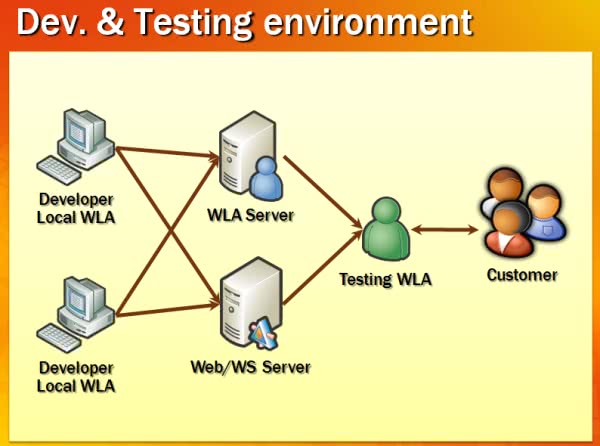
After working for more than a year developing WLAs, we at ilitia have built a small infrastructure (mostly virtualized/using virtual machines). Right now our WLA department works like this diagram:
Each developer works with a local copy of the WLA (using Visual Sourcesafe to integrate changes), having a local testing Microsoft Passport-enabled account.
We have a "WLA Server" in which we upload (at least once per week) the latest working build, which runs in another account that we give to our customer since the second or third week of development, so they can start testing the agent early and giving feedback (agile development and that stuff ;), just using their Windows Live Messenger clients.
We create mocks of customer Web Services if it is feasible (somethimes they're too complex, or the customer already has a testing WS created) and the Activity Window web pages and host them too, until the Activity is provisioned to Messenger.
We also have a private WLA intranet with our own tutorials, development guidelines and repository for Buddyscript modules, documents, testing account-password pairs and such.
One feature we're still missing is automatic unit test battery launching, like in a Continuous Integration server. But we do have unit testing since two months or so. If you want some info about the platform's default testing capabilities you can check some official posts of the WLA team's blog.
The system was somewhat lacking advanced features and more testing options, and coming from the NUnit testing world, I decided to make a new unit testing framework from scratch (although I used some of the original framework as basis, it has been heavily modified and improved).
I won't show any code until the next post, but this is an example of a sample passing battery output:
-----------------------
Begin testing: TestUtilitiesAddon -> TestExCompareQueryArray() Test Battery
Test: "TestExCompareQueryArray"
Test: "TestExCompareQueryArrayNotEqual"
Test: "TestExCompareQueryArrayNotEqual"
Test: "TestExCompareQueryArray"
Done testing TestUtilitiesAddon -> TestExCompareQueryArray() Test Battery
Total tests: 4 Passed tests: 4 Failed tests: 0
Test battery passed
-----------------------
(as you might notice, I've used the framework to test it's own testing/assert methods ;)
A sample output of a failed test could be like this one:
-----------------------
Begin testing: TestUtilitiesAddon -> TestExCompareObjects() Test Battery
Test: "TestExCompareObjects"
Error: "not object #2" failed.
Returned: "not object #2"
"not object #2" not an object
-----------------------
Done testing TestUtilitiesAddon -> TestExCompareObjects() Test Battery
Total tests: 1 Passed tests: 0 Failed tests: 1
Test battery failed
-----------------------
In the next post I will show the basics of building a testing framework and how to test both variable values and objects.