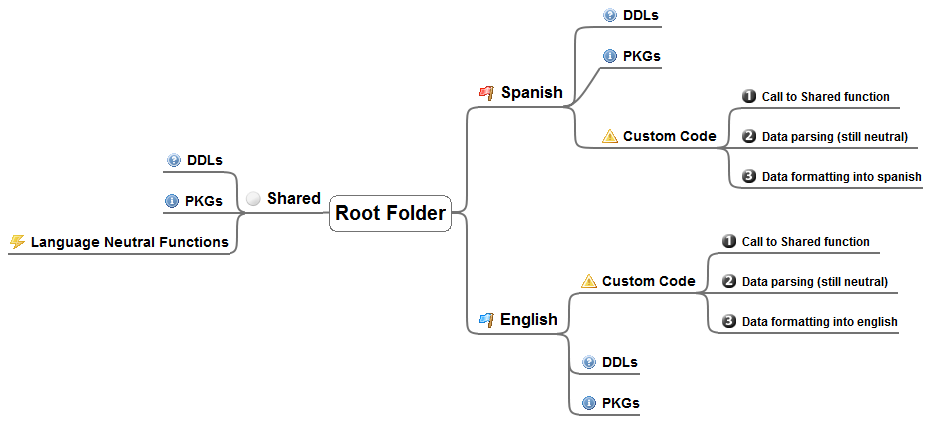
Click on the diagram to enlarge it
In order to implement correctly structured code for a Windows Live Agent, we should remember that the /Shared folder exists and what its purpose is. If we want to access an RSS feed and display its contents, the data access code (at least) should be placed inside Shared.
Then, we can parse & format the data, adding localized text, displaying it in different formats (for example currency, or datetimes). The following diagram provides an example for a spanish & english agent:
Click on the diagram to enlarge it
Apart from that, I prefer refactoring the included patterns for all "ChitChat" (default conversations the agent can understand and handle), because when developing a multilanguage agent is not always easy to find the equivalent in other languages (at least in English<->Spanish some translations are not equal). Also, sometimes I want to reuse a set of answers for multiple patterns.
So what I do is take a pattern like this from _agent_root_/Spanish/Chat which calls a procedure in /BuddyscriptLib/Spanish/Extensions/Chat/Agent_es.pkg:
{title="¿Quién me hizo?" category="Spanish - About MACRO_AGENT_NAME_ES" contributor="Microsoft" body_type="buddyscript" editable="1"}
answers QuiénHizoEsteAgenteInteractivo
call QuiénHizoEsteAgenteInteractivoAnswer()
And do this steps:
procedure WhoMadeTheAgentSpanishAnswer()
- He sido creado por MACRO_AGENT_CREATORS_ES
call CambiarTema("mis creadores")
{title="¿Quién me hizo?" category="Spanish - About MACRO_AGENT_NAME_ES" contributor="Microsoft" body_type="buddyscript" editable="1"}
answers QuiénHizoEsteAgenteInteractivo
call WhoMadeTheAgentSpanishAnswer()
I will keep the same folder & files structure in the _agent_root_/English/, just using english equivalent procedures (but with same notation), like this:
{title="Who Made Me" category="English - About MACRO_AGENT_NAME" contributor="Microsoft" body_type="buddyscript" editable="1"}
+- Who made MACRO_AGENT_NAME?
answers WhoMadeThisInteractiveAgent
call WhoMadeTheAgentEnglishAnswer()
I personally find much better to have extra subfolders organizing the packages (which I try to limit to as few different topics as possible each one), and by using the same xxxxxxxSpanishAnswer() xxxxxxxEnglishAnswer() I can even assign to someone else the task of modifying the pattern an customizing it to my desire).
As a final tip/trick, in /Shared/Global.pkg we can find some macros for default text substitutions, like this one:
macro COMPANY_NAME Kartones.Net
And the spanish localized version:
macro COMPANY_NAME_ES Kartones.Net
Then, they can be used to place the right string anywhere:
procedure GeneralAgentPresentationEnglishAnswer()
- I'm MACRO_AGENT_NAME, your guide to MACRO_COMPANY_NAME.
But what if you want to add a new macro? Well... it is so simple! Add it on /Shared/Global.pkg file:
macro AGENT_CREATORS Kartones
And just call it from a pattern adding MACRO_ before it's name:
procedure WhoMadeTheAgentEnglishAnswer()
- I was built by MACRO_AGENT_CREATORS.
call ChangeSubject("my creators")