Title: VS2005 Unit Tests and copying files
Slug: vs2005-unit-tests-and-copying-files
Date: 2007-04-21 08:05:00
Author: Kartones
Lang: en
Tags: Testing, Visual Studio, Development
Description: A guide on configuring VS2005 unit tests to copy files to the output folder before execution.

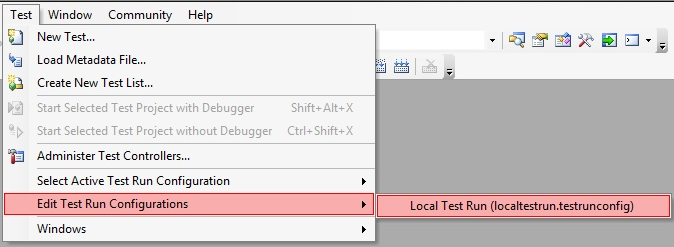
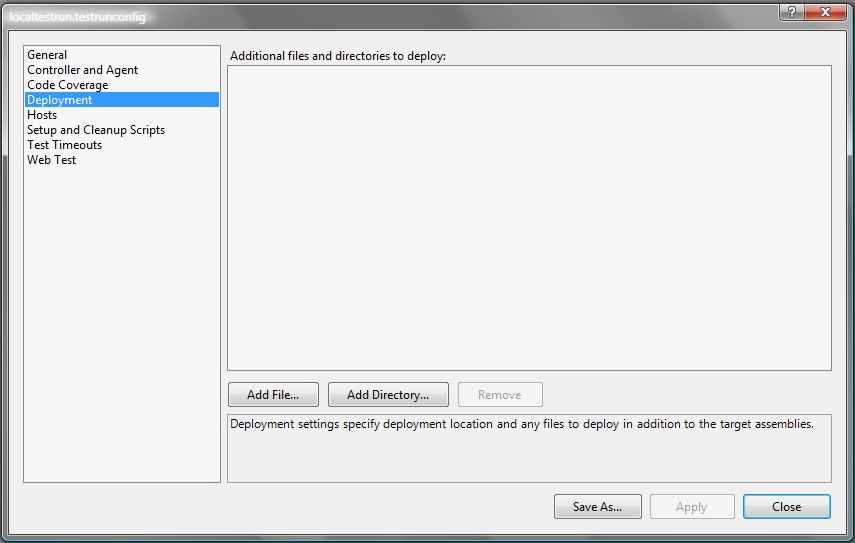
<p> Sometimes you need to copy some files to the output folder before executing your application from Visual Studio. This isn't a problem, unless you're going to execute a VS2005 unit test battery, because it creates a custom output folder before launching the test battery, so it's no easy task to move for example a xml file there.</p> <p>This is an example of how a test output folder looks:<br><img title="Example output folder" alt="Example output folder" src="https://images.kartones.net/posts/screenshots/vs2005_unit_tests_example_output_folder.png"></p> <p>In the <i>Test</i> menu -&gt; <i>Edit Test Run Configurations</i> -&gt; <i>(your .testrunconfig file)</i><br><img title="Output folder configuration" alt="Output folder configuration" src="https://images.kartones.net/posts/screenshots/vs2005_unit_tests_output_folder_config01.png"></p> <p>Select the Deployment item, and here we are, all the files and directories added will be automatically copied before executing the tests.<br><img title="Output folder configuration" alt="Output folder configuration" src="https://images.kartones.net/posts/screenshots/vs2005_unit_tests_output_folder_config02.png"></p> <p> Many thanks to Sibille for pointing me to the <a href="http://blogs.msdn.com/john_pollard/archive/2005/12/21/copying-files-needed-for-visual-studio-2005-unit-tests.aspx">original source of this</a>.<span class="Apple-tab-span" style="white-space:pre">	</span></p>