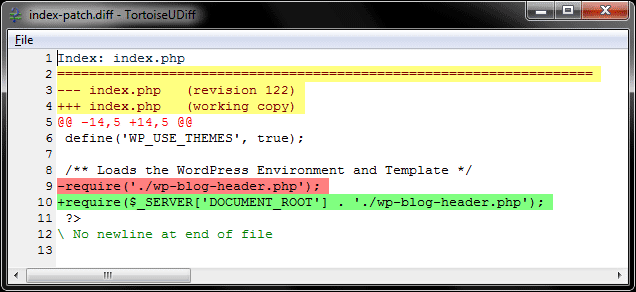
One concept not so known in the typical enterprise .NET world (I don´t know if in other languages like Java happens or not) is the concept of patches. A patch or diff is a file that contains a change list (of one or more files), pretty much exactly what a "svn diff" would output.
The main use of a patch is to avoid having to redo once and again the same changes to files. To give a real example, I have a small Wordpress blog to do some tests on it, and each time I update WP it breaks because of this:
My Windows hosting forces me to append $_SERVER['DOCUMENT_ROOT'] to the paths because relative paths are disabled, so each update made me write again the same piece of code in the index.php file.
Creating and applying patch files with TortoiseSVN is so easy... As the official documentation says, just choose Create Patch instead of Commit when you have changes, save the patch into a file, and then when you need to apply it, Apply Patch (folder level, even if the patch affects just one file the context menu option only appears right-clicking on folders).
Until I started to use Subversion I had just heard about this concept, but thought was not so useful (I was using Visual SourceSafe so my SCC world was pretty narrow). Now I'm slowly starting to build patches for some common tasks, specially for opensource projects that get frequent updates.