Yesterday I finished toying with PocketOutlook and GMail CSV export option. Now I've got (at last) my GMail contacts clean and tidy, and imported into my phone.
I did a small application that reads a CSV file (you must export your contact list in 'GMail CSV' format) and imports it using the PocketOutlook .NET object model. I can only say it's great, I spent more time mapping GMail fields into Outlook fields that coding business logic (and the whole coding didn't took me more than a few hours).
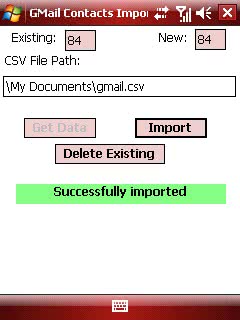
This is how the app looks:
As for the source code, it is for Windows Mobile 6, and uses the fantastic FileHelpers Library (thanks for showing it to me, Jesus). The main PPC app just instantiates my GMail2PocketOutlookLib which does all the heavy stuff.
To access Outlook just reference Microsoft.WindowsMobile.PocketOutlook and write code like this:
OutlookSession outlookSession = new OutlookSession();
ContactCollection existingContacts = outlookSession.Contacts.Items;
Contact newContact = new Contact();
newContact.FirstName = newContacts[index].Name;
newContact.FileAs = newContacts[index].Name;
newContact.Email1Address = newContacts[index].Email;
// ...
existingContacts.Add(newContact);
With FileHelpers I did all the CSV reading in no time, and as you can see the import process can't be easier.
You can download the full source code and binaries in the Downloads section.
Next is doing a bit of I+D about Google Calendar API and coding a small sync tool. I don't like the fact that either you sync with outlook or you can't sync anything except files (and I use Google Calendar instead of Outlook).
Note: Code contains one unused Property, some comments missing, and the import process may mess up because of some issues with GMail CSV contents (there's a txt file explaining all). Initially I don't plan to update it, but if you fix or improve something, you're welcome!