Title: Introducing KartonesNet.APIs.GoogleAnalyticsAPI
Slug: introducing-kartonesnet-apis-googleanalyticsapi
Date: 2009-06-08 00:30:00
Author: Kartones
Lang: en
Tags: Kartones.Net
Description: Introducing KartonesNet.APIs.GoogleAnalyticsAPI.

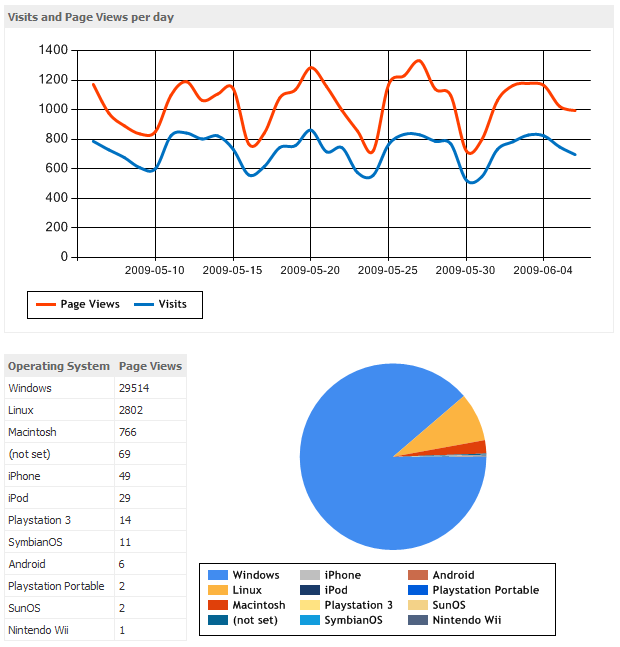
 <p>This weekend, in my spare time, I've finally achieved one thing I wanted since some time: Fully automating the Site Stats of Kartones.Net.</p>  <p>Previously, I had to manually update the page with the current data each month, plus exporting some Google Analytics reports in PDF. As computers are supposed to exist to make our lives easier (although for developers is more of the opposite actualy :), I decided to use the <strong>Google Analytics Data Export API</stron> (which as usual uses GData for retrieval of the information) and <a href="http://www.microsoft.com/downloads/details.aspx?FamilyID=130f7986-bf49-4fe5-9ca8-910ae6ea442c&amp;DisplayLang=en">ASP.NET Chart Controls</a> to create an automated and live stats page.</p>  <p>As I had in mind publishing the class under my <a href="https://kartones.net/downloads/KartonesNet_CS2007_Addon_Pack.zip">KartonesNet CS2007 Addon Pack</a>, I've made some things in the code specifically to make it more customizable by anyone. But let's get into how I've made it and how it works...</p>  <p> </p>  <p>Without entering into details of how GData works, as usual working with it when being authenticated we will make http request to specific urls and retrieve XML contents (in which we will have a list of <font face="Courier New">&lt;entry&gt;</font> elements). The requests have this format:</p>  <p><font face="Courier New">https://www.google.com/analytics/feeds/data?ids=ga:<b><font color="#ff0000">_ProfileID_</font></b>&amp;dimensions=<b><font color="#ff0000">_Dimensions_</font></b>&amp;metrics=<b><font color="#ff0000">_Metrics_</font></b>&amp;sort=<b><font color="#ff0000">_OrderBy_</font></b>&amp;start-date=<b><font color="#ff0000">_StartDate_</font></b>&amp;end-date=<b><font color="#ff0000">_EndDate_</font></b>&amp;prettyprint=true&amp;max-results=<b><font color="#ff0000">_MaxResults_</font></b></font> </p>  <p>As we can see, the first parameter is a Profile ID, obtained after authentication. My API supports only <code>ClientLogin</code> (user &amp; password, as usual *), but there are other methods. After authentication, we will receive an authorization token, which we will need to always specify in the headers of our Http Requests:</p>  <p><font face="Courier New">request.Headers.Add("Authorization: GoogleLogin auth=" + <b><font color="#ff0000">sessionToken</font></b>);</font></p>  <p>The profile ID represents the "site" we want to get data about. If you don't know the profile ID of your site, or only have one, don't bother with it, if you call the API <font face="Courier New">Login()</font> method without ProfileID, it will get the first available one.</p>  <p>Login with the API can't be easier:</p>  <p><font face="Courier New"><font color="#000000">GoogleAnalyticsAPI googleAnalytics </font><font color="#0000ff">= new </font><font color="#000000">GoogleAnalyticsAPI()</font></font><font face="Courier New"><font color="#0000ff">;        <br>bool </font><font color="#000000">loginSuccess </font><font color="#0000ff">= </font><font color="#000000">googleAnalytics.Login(user, password)</font></font><font color="#0000ff" face="Courier New">;      <br>if </font><font color="#000000" face="Courier New">(loginSuccess)      <br>{       <br>    ...</font></p>  <p> </p>  <p>After authentication, we can make GData requests to gather data, by specifying <a href="http://code.google.com/apis/analytics/docs/gdata/gdataReferenceDimensionsMetrics.html">dimensions and metrics</a>. As the documentation is pretty self-explaining I won't enter into details, just mentioning that it is important to check the <a href="http://code.google.com/apis/analytics/docs/gdata/gdataReferenceDimensionsMetrics.html#validCombinations">valid combinations</a> of them because you can have errors with given combinations.</p>  <p>I have recreated for Kartones.Net some basic reports, like visits/pageviews, visitor OS, browser and language config, or a ‘Top 20 content pages'. There is a lot of room for imagination here, specially if you perform operations with the returned data.</p>  <p>The API calls are very simple:</p>  <p><font face="Courier New"><font color="#0000ff">public string </font><font color="#000000">GADataCall(</font><font color="#0000ff">string</font><font color="#000000">[] Dimensions, </font><font color="#0000ff">string</font><font color="#000000">[] Metrics, </font><font color="#0000ff">string </font><font color="#000000">OrderBy)</font><font color="#0000ff">;</font></font></p>  <p>I have not made enumerations for dimensions/metrics just in case Google extends it (and because they are a lot and I only needed a few for my reports), and the OrderBy parameter can be set to null/string.Empty if you don't want ordering.</p>  <p>Note: To specify a descending order, prepend a minus to the field, e.g.: <font face="Courier New">-ga:pageviews</font></p>  <p>A few important things about the API calls to gather data:</p>  <ul>   <li>The date range of data to request is defined with the <font face="Courier New">StartingDate</font> and <font face="Courier New">EndingDate</font> properties of the <font face="Courier New">GoogleAnalyticsAPI</font> class. If not specified, they will set to retrieve from the past month up to yesterday (same day). </li>    <li>The number of results is specified too with the property <font face="Courier New">MaxResults</font>. By default is 50. </li>    <li>If running under ASP.NET, call results are cached automatically for the number of seconds specified in <font face="Courier New">CacheExpirationTime</font> (default: 300 secs). </li>    <li>And most important, returned data from this call is not XML, but a formatted string. ¿How do we format that string?... </li> </ul>  <p>One thing I wanted is to allow customization of the results while keeping them small and light. My scenario was the web, but even in there I needed more than only "table formatting" with &lt;tr&gt; and &lt;td&gt;, so I created this small interface:</p>  <p><font color="#0000ff" face="Courier New">namespace </font><font color="#000000" face="Courier New">KartonesNet.APIs      <br>{       <br>    </font><font face="Courier New"><font color="#006400">/// &lt;summary&gt;        <br>    /// Interface for implementing a Google Analytics data formatter         <br>    /// &lt;/summary&gt;         <br>    </font><font color="#0000ff">public interface </font></font><font color="#000000" face="Courier New">IGoogleAnalyticsDataFormatter      <br>    {       <br>        </font><font face="Courier New"><font color="#006400">/// &lt;summary&gt;        <br>        /// Tag to inject before each element         <br>        /// &lt;/summary&gt;         <br>        /// &lt;returns&gt;Tag&lt;/returns&gt;         <br>        </font><font color="#0000ff">string </font><font color="#000000">PreElementTag()</font></font><font color="#0000ff" face="Courier New">;      <br>      <br>        </font><font face="Courier New"><font color="#006400">/// &lt;summary&gt;        <br>        /// Tag to inject before each field of an element         <br>        /// &lt;/summary&gt;         <br>        /// &lt;returns&gt;Tag&lt;/returns&gt;         <br>        </font><font color="#0000ff">string </font><font color="#000000">PreFieldTag()</font></font><font color="#0000ff" face="Courier New">;      <br>      <br>        </font><font face="Courier New"><font color="#006400">/// &lt;summary&gt;        <br>        /// Tag to inject after each field of an element         <br>        /// &lt;/summary&gt;         <br>        /// &lt;returns&gt;Tag&lt;/returns&gt;         <br>        </font><font color="#0000ff">string </font><font color="#000000">PostFieldTag()</font></font><font color="#0000ff" face="Courier New">;      <br>      <br>        </font><font face="Courier New"><font color="#006400">/// &lt;summary&gt;        <br>        /// Tag to inject after each element         <br>        /// &lt;/summary&gt;         <br>        /// &lt;returns&gt;Tag&lt;/returns&gt;         <br>        </font><font color="#0000ff">string </font><font color="#000000">PostElementTag()</font></font><font color="#0000ff" face="Courier New">;      <br>    </font><font color="#000000" face="Courier New">}      <br>}</font></p>  <p>Very simple and customizable (you can simply return string.Empty on those values you don't want to use). I provide three DataFormatters with the API:</p>  <ul>   <li><i>GoogleAnalyticsCommaDataFormatter</i>: A simple concatenation of fields via commas. Very useful for manipulating later data (with a simple <font face="Courier New">string.split(‘,')</font>) </li>    <li><i>GoogleAnalyticsTableDataFormatter</i>: Simple table formatter, adds &lt;tr&gt;&lt;td&gt;&lt;/td&gt;&lt;/tr&gt; structure. Note: It adds Community Server css classes too, so I recommend you to create another one without custom css classes. </li>    <li><i>GoogleAnalyticsTableWithLinkDataFormatter</i>: The same as the previous one, but converting the first field of each data element/entry into a HREF tag (for the Top 20 content pages) and prepending the host url (‘http://Kartones.net') to it. </li> </ul>  <p>This is an example call that uses all stuff (not much anyway):</p>  <p><font face="Courier New"><font color="#000000">googleAnalytics.DataFormatter </font><font color="#0000ff">= new </font><font color="#000000">GoogleAnalyticsTableDataFormatter()</font></font><font face="Courier New"><font color="#0000ff">;       <br></font><font color="#000000">googleAnalytics.MaxResults </font><font color="#0000ff">= </font><font color="#800000">12</font></font><font face="Courier New"><font color="#0000ff">;       <br></font><font color="#000000">osGAData </font><font color="#0000ff">= </font></font><font face="Courier New"><font color="#000000">googleAnalytics.GADataCall(       <br>        </font><font color="#0000ff">new string</font><font color="#000000">[] { </font><font color="#808080">"ga:operatingSystem" </font></font><font face="Courier New"><font color="#000000">},       <br>        </font><font color="#0000ff">new string</font><font color="#000000">[] { </font><font color="#808080">"ga:pageviews" </font></font><font face="Courier New"><font color="#000000">},       <br>        </font><font color="#808080">"-ga:pageviews"</font><font color="#000000">)</font><font color="#0000ff">;</font></font></p>  <p> </p>  <p> And not much else to add... Plugging the gathered data into the ASP.NET Charting Control as usual took more time for visual setup than for logic itself but was really easy, and as it has caching too, the resulting stats page loads pretty fast on subsequent calls (and not slow on the first one).</p>  <p> </p>  <p>Here is a screenshot of how all this looks once finished:</p>  <p><img title="The new Kartones.Net site stats" alt="The new Kartones.Net site stats" src="https://images.kartones.net/posts/kartonesblog/kartonesnet_newstats.png"></p>  <p>All that remains is <a href="https://kartones.net/downloads/KartonesNet_CS2007_Addon_Pack.zip">grabbing the component</a> and making your own reports!</p>  <p>I hope the API proves useful, feel free to drop a comment with suggestions, problems or just thoughts about it :)</p>
