Title: Excel and CSV files
Slug: excel-and-csv-files
Date: 2008-10-18 08:23:00
Author: Kartones
Lang: en
Tags: Development, C#, CSV, MS Excel
Description: A guide on handling Excel and CSV files.

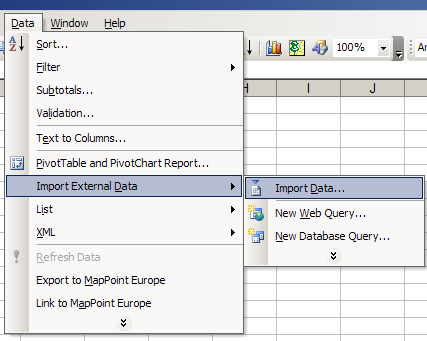
<p><b>Update</b>: A second part of this post <a href="https://blog.kartones.net/post/excel-and-csv-files-ii">is available here</a>.<br><br>CSV, or Comma-Separated Values, it is an old file format still used because of it's simplicity. Basically, you simulate colums by using commas and rows by using newlines. The full specification can be read <a href="http://en.wikipedia.org/wiki/Comma-separated_values">at the Wikipedia</a>.</p> <p>One of the reasons of being so widely used is Microsoft Excel's capabilities of quickly reading and transforming them into full spreadsheets (very useful for non-technical customers!).</p> <p>If a CSV field has already commas or newlines, you can put it's contents into double quotes (<b>"</b>) to make a CSV parser not split the content into different columns or even rows.</p> <p>Here it is a small sample code in C# that "safe writes" a CSV field:</p> <p><font face="Courier New"><font color="blue">public string </font><font color="black">WriteCSVItem(</font><font color="blue">object </font><font color="black">Item, </font><font color="blue">bool </font></font><font face="Courier New"><font color="black">Quote)<br>    {<br>        </font><font color="blue">int </font><font color="black">index</font></font><font face="Courier New"><font color="blue">;<br>        string </font><font color="black">results </font><font color="blue">= string</font><font color="black">.Empty</font></font><font face="Courier New"><font color="blue">;<br>        <br>        if </font><font color="black">(Item </font><font color="blue">== null</font></font><font face="Courier New"><font color="black">)<br>            </font><font color="blue">return string</font><font color="black">.Empty</font></font><font face="Courier New"><font color="blue">;<br>        else<br>            </font><font color="black">results </font><font color="blue">= </font><font color="black">Item.ToString()</font></font><font face="Courier New"><font color="blue">;<br>                <br>        </font><font color="black">index </font><font color="blue">= </font><font color="black">results.IndexOf(</font><font color="#808080">"\""</font><font color="black">)</font></font><font face="Courier New"><font color="blue">;<br></font></font><font face="Courier New"><font color="black">        </font><font color="blue">while </font><font color="black">(index &gt; -</font><font color="maroon">1</font></font><font face="Courier New"><font color="black">)<br>        {<br>            results </font><font color="blue">= </font><font color="black">results.Substring(</font><font color="maroon">0</font><font color="black">, index) + </font><font color="#808080">"\"" </font><font color="black">+ results.Substring(index)</font></font><font color="blue" face="Courier New">;<br>            if </font><font face="Courier New"><font color="black">(index+2 &lt;= results.Length)<br>                index </font><font color="blue">= </font><font color="black">results.IndexOf(</font><font color="#808080">"\""</font><font color="black">, index+2)</font></font><font face="Courier New"><font color="blue">;<br>            else<br>                </font><font color="black">index </font><font color="blue">= </font><font color="black">-</font><font color="maroon">1</font><font color="blue">;    </font></font><font color="darkgreen" face="Courier New">// End reached<br>        </font><font face="Courier New"><font color="black">}<br>        <br>        </font><font color="blue">if </font><font color="black">((results.IndexOf(</font><font color="#808080">"\n"</font><font color="black">) &gt; -</font><font color="maroon">1</font></font><font face="Courier New"><font color="black">) || (<font face="Courier New"><font color="black">results.IndexOf(</font><font color="#808080">","</font><font color="black">) &gt; -</font><font color="maroon">1</font></font><font face="Courier New"><font color="black">) ||</font></font> (Quote))<br>            results </font><font color="blue">= </font><font color="#808080">"\"" </font><font color="black">+ results + </font><font color="#808080">"\""</font></font><font face="Courier New"><font color="blue">;<br>                <br>        return </font><font color="black">results</font></font><font face="Courier New"><font color="blue">;<br>    </font><font color="black">}</font></font></p> <p> </p> <p>So, if this is so simple, what's the problem?</p> <p>Well, other more general implementations of the CSV (and almost all standard delimited text file parsers) allow additional separators apart from the comma (for example, tabs or semicolons). And MS Excel tries to be "so smart" that if you open a CSV file and you have any separator <b>except the comma</b>, it will reformat the CSV, converting it to rows and columns using the comma as separator.</p> <p>And the problem comes that Excel will reformat separating via commas <b>even if the column data comes inside double quotes</b>. And that messes up any non-comma separated CSV data with a "description" field that commonly has at least one comma inside...</p> <p> </p> <p>So, if you're planning on giving your application CSV export capabilities, you have two options:</p> <p>1) Always use comma as the separator, and respect the CSV standard. I recommend placing all fields inside double quotes. This way Excel will open and format the rows and columns <b>correctly</b>.</p> <p>2) Use any other separator, and do not forget to tell your users not to open directly the CSV files, but instead a new, blank spreadsheet and then Import the CSV:</p> <p><img src="https://images.kartones.net/posts/screenshots/excel_import_csv.png" mce_src="https://images.kartones.net/posts/screenshots/excel_import_csv.png"></p> <p>The <i>Import Data</i> option launches a wizard that allows to specify the delimiter character and respects the double quotes correctly.</p> <p> </p> <p><b>Note</b>: I have used MS Excel 2003 because it is the more widespread version currently in customers. I haven't tried direct opening with Excel 2007 of a non-comma separated CSV.</p>
