Title: Community Server 2007: Extend user profile to add Twitter account and auto-tweet
Slug: community-server-2007-extend-user-profile-to-add-twitter-account-and-auto-tweet
Date: 2009-01-29 06:20:00
Author: Kartones
Lang: en
Tags: Development, C#, ASP.NET, Social Networks, Kartones.Net, .NET
Description: Explains how to extend Community Server 2007's user profile to add a Twitter account and enable auto-tweeting.

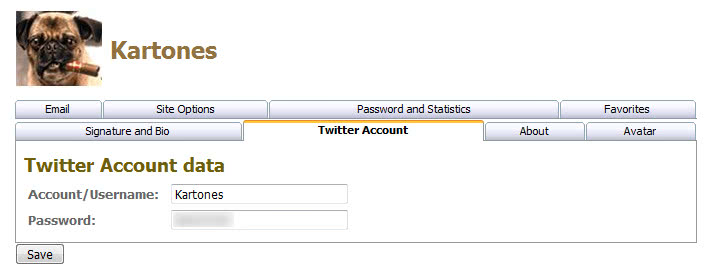
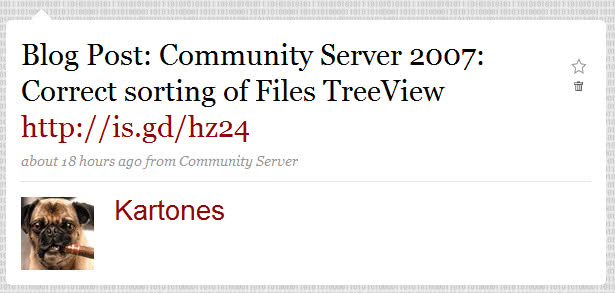
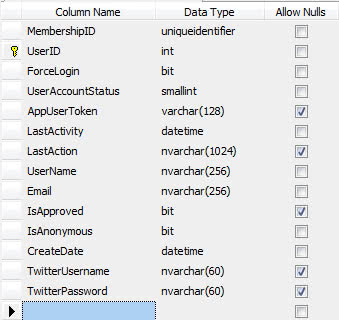
 <p> I've learned how to extend Community Server's user profile fields to add additional ones for storing a Twitter account data and auto-posting when publishing new content.</p>  <p>In this post I will show you how to do it, but first of all I want to thank Jon for his fantastic post (link is dead) about how to extend user profiles. It avoided me a lot of work searching for what and where to change :)</p>  <p><u>Database modifications</u></p>  <ol>   <li>Modify the table <b>cs_users</b>, and add two text fields for the account username and password (remember to make them nullable!)       <br><img src="https://images.kartones.net/posts/screenshots/extuserprofiles_01.jpg"> </li>    <li>Modify the stored procedure <b>cs_user_CreateUpdateDelete</b>:       <br>· Add two new arguments:       <pre class="code">@TwitterUsername <span style="color: blue">nvarchar </span><span style="color: gray">(</span>60<span style="color: gray">) = null,<br></span>@TwitterPassword <span style="color: blue">nvarchar </span><span style="color: gray">(</span>60<span style="color: gray">) = null,</span></pre>    <br>· And modify the <b>INSERT INTO cs_Users </b>and <b>UPDATE cs_Users</b> to include the two new arguments.     <br></li>  <li>Modify the view <b>cs_vw_Users_FullUser</b> to obtain the two new table fields:     <pre class="code">U<span style="color: gray">.</span>TwitterUsername<span style="color: gray">,</span>U<span style="color: gray">.</span>TwitterPassword<span style="color: gray">,</span></pre>  </li></ol><p><u>Community Server components modifications</u></p><ol>  <li>Modify <b>CommunityServer.Components.User</b> to add new properties:     <pre class="code"><span style="color: blue">string </span>twitterUsername;<span style="color: blue">string </span>twitterPassword;<br></pre>    <pre class="code"><span style="color: blue">public string </span>TwitterUsername{    <span style="color: blue">get    </span>{        <span style="color: blue">return </span>twitterUsername;    }    <span style="color: blue">set    </span>{        twitterUsername = <span style="color: blue">value</span>;    }}<span style="color: blue">public string </span>TwitterPassword{    <span style="color: blue">get    </span>{        <span style="color: blue">return </span>twitterPassword;    }    <span style="color: blue">set    </span>{        twitterPassword = <span style="color: blue">value</span>;    }}</pre>  </li>  <li>Modify <b>CommunityServer.Data.SqlCommonDataProvider</b> to send the new fields to the DB when creating or updating a user:     <br>    <pre class="code"><span style="color: blue">public override </span><span style="color: #2b91af">User </span>CreateUpdateDeleteUser( [...] ) <br>{<br>    [...]</pre>    <pre class="code">    myCommand.Parameters.Add(<span style="color: #a31515">"@TwitterUsername"</span>, <span style="color: #2b91af">SqlDbType</span>.VarChar, 60).Value = <br>        upm.CurrentUser.TwitterUsername;    myCommand.Parameters.Add(<span style="color: #a31515">"@TwitterPassword"</span>, <span style="color: #2b91af">SqlDbType</span>.VarChar, 60).Value = <br>        upm.CurrentUser.TwitterPassword;<br><br><br><br></pre>  </li>  <li>Modify <b>CommunityServer.Components.CommonDataProvider</b> to retrieve the new fields and store them in the User class:     <br>    <pre class="code"><span style="color: blue">public static </span><span style="color: #2b91af">User </span>PopulateUserFromIDataReader(<span style="color: #2b91af"><font color="#000000"> [...] </font></span>) <br>{<br>    [...]</pre>    <pre class="code">    user.TwitterUsername = dr[<span style="color: #a31515">"TwitterUsername"</span>] <span style="color: blue">as string</span>;    user.TwitterPassword = dr[<span style="color: #a31515">"TwitterPassword"</span>] <span style="color: blue">as string</span>;<br></pre>  </li>  <li>Modify <b>CommunityServer.Controls.EditUserForm</b> to add the logic for populating textboxes and saving their values whenever editing an existing user:     <br>    <pre class="code"><span style="color: #2b91af">TextBox </span>TwitterUsernameTextBox;<span style="color: #2b91af">TextBox </span>TwitterPasswordTextBox;<br><br></pre>    <pre class="code"><span style="color: blue"><br>public string </span>TwitterUsernameTextBoxId{    <span style="color: blue">get    </span>{        <span style="color: blue">return </span>(<span style="color: blue">string</span>)ViewState[<span style="color: #a31515">"TwitterUsernameTextBoxId"</span>] ?? <span style="color: blue">string</span>.Empty;    }    <span style="color: blue">set    </span>{        ViewState[<span style="color: #a31515">"TwitterUsernameTextBoxId"</span>] = <span style="color: blue">value</span>;    }}</pre>    <pre class="code"><span style="color: blue">public string </span>TwitterPasswordTextBoxId{    <span style="color: blue">get    </span>{        <span style="color: blue">return </span>(<span style="color: blue">string</span>)ViewState[<span style="color: #a31515">"TwitterPasswordTextBoxId"</span>] ?? <span style="color: blue">string</span>.Empty;    }    <span style="color: blue">set    </span>{        ViewState[<span style="color: #a31515">"TwitterPasswordTextBoxId"</span>] = <span style="color: blue">value</span>;    }}</pre>    <pre class="code"><span style="color: blue">protected override void  </span>AttachChildControls(){<br>    [...]<br></pre>    <pre class="code">    TwitterUsernameTextBox = <br>        <span style="color: #2b91af">CSControlUtility</span>.Instance().FindControl(<span style="color: blue">this</span>, TwitterUsernameTextBoxId) <span style="color: blue">as </span><span style="color: #2b91af">TextBox</span>;    TwitterPasswordTextBox = <br>        <span style="color: #2b91af">CSControlUtility</span>.Instance().FindControl(<span style="color: blue">this</span>, TwitterPasswordTextBoxId) <span style="color: blue">as </span><span style="color: #2b91af">TextBox</span>;<br>    <br>    [...]<br><br>}</pre>    <pre class="code"><span style="color: blue">public override void </span>DataBind()<br>{<br>    [...]<br></pre>    <pre class="code"><span style="color: blue">    if </span>(!Page.IsPostBack)    {<br>        [...]<br></pre>    <pre class="code"><span style="color: blue">        if </span>(TwitterUsernameTextBox != <span style="color: blue">null</span>)            TwitterUsernameTextBox.Text = userToEdit.TwitterUsername;<span style="color: blue">        if </span>(TwitterPasswordTextBox != <span style="color: blue">null</span>)            TwitterPasswordTextBox.Text = userToEdit.TwitterPassword;<br> <br>        [...]<br>    }<br> <br>    [...]<br>}</pre>    <pre class="code"><span style="color: blue">void  </span>SubmitButton_Click(<span style="color: blue">object </span>sender, <span style="color: #2b91af">EventArgs </span>e){<br>    [...]<br></pre>    <pre class="code"><span style="color: blue">    if </span>(TwitterUsernameTextBox != <span style="color: blue">null</span>)        userToEdit.TwitterUsername = TwitterUsernameTextBox.Text;<span style="color: blue">    if </span>(TwitterPasswordTextBox != <span style="color: blue">null</span>)        userToEdit.TwitterPassword = TwitterPasswordTextBox.Text;<br><br> <br>    [...]<br>}</pre>  </li></ol><p><u>Community Server Web modifications</u></p><ol>  <li>Modify the /Themes/xxxxx/User/EditUser.aspx to add a new tab, textboxes and mapping of them to the components form previously modified:     <br>· Add a new tab with the desired layout to the TabbedPanes:     <br>    <pre class="code"><span style="color: blue">&lt;</span><span style="color: #a31515">TWC</span><span style="color: blue">:</span><span style="color: #a31515">TabbedPanes </span><span style="color: red">id</span><span style="color: blue">="ProfileTabs" </span><span style="color: red">runat</span><span style="color: blue">="server"</span><span style="color: red"><font color="#0000ff">    </font>PanesCssClass</span><span style="color: blue">="CommonPane"    </span><span style="color: red">TabSetCssClass</span><span style="color: blue">="CommonPaneTabSet"    </span><span style="color: red">TabCssClasses</span><span style="color: blue">="CommonPaneTab,CommonPaneTab1,CommonPaneTab2"    </span><span style="color: red">TabSelectedCssClasses</span><span style="color: blue">="CommonPaneTabSelected,CommonPaneTabSelected1,CommonPaneTabSelected2"    </span><span style="color: red">TabHoverCssClasses</span><span style="color: blue">="CommonPaneTabHover,CommonPaneTabHover1,CommonPaneTabHover2"&gt;      [...]</span><span style="color: blue">    &lt;</span><span style="color: #a31515">TWC</span><span style="color: blue">:</span><span style="color: #a31515">TabbedPane </span><span style="color: red">runat</span><span style="color: blue">="server"&gt;        &lt;</span><span style="color: #a31515">Tab</span><span style="color: blue">&gt;</span>Twitter Account<span style="color: blue">&lt;/</span><span style="color: #a31515">Tab</span><span style="color: blue">&gt;        &lt;</span><span style="color: #a31515">Content</span><span style="color: blue">&gt;             &lt;</span><span style="color: #a31515">h3 </span><span style="color: red">class</span><span style="color: blue">="CommonSubTitle"&gt;</span>Twitter Account data<span style="color: blue">&lt;/</span><span style="color: #a31515">h3</span><span style="color: blue">&gt;             &lt;</span><span style="color: #a31515">table</span><span style="color: blue">&gt;             &lt;</span><span style="color: #a31515">tr</span><span style="color: blue">&gt;                 &lt;</span><span style="color: #a31515">td </span><span style="color: red">class</span><span style="color: blue">="CommonFormFieldName"&gt;                     </span>Account/Username:                 <span style="color: blue">&lt;/</span><span style="color: #a31515">td</span><span style="color: blue">&gt;                 &lt;</span><span style="color: #a31515">td </span><span style="color: red">class</span><span style="color: blue">="CommonFormField"&gt;                     &lt;</span><span style="color: #a31515">asp</span><span style="color: blue">:</span><span style="color: #a31515">Textbox </span><span style="color: red">id</span><span style="color: blue">="TwitterUsername" </span><span style="color: red">Columns</span><span style="color: blue">="30" </span><span style="color: red">MaxLength</span><span style="color: blue">="60" </span><span style="color: red">runat</span><span style="color: blue">="server" /&gt;                 &lt;/</span><span style="color: #a31515">td</span><span style="color: blue">&gt;             &lt;/</span><span style="color: #a31515">tr</span><span style="color: blue">&gt;             &lt;</span><span style="color: #a31515">tr</span><span style="color: blue">&gt;                 &lt;</span><span style="color: #a31515">td </span><span style="color: red">class</span><span style="color: blue">="CommonFormFieldName"&gt;                     </span>Password:                 <span style="color: blue">&lt;/</span><span style="color: #a31515">td</span><span style="color: blue">&gt;                 &lt;</span><span style="color: #a31515">td </span><span style="color: red">class</span><span style="color: blue">="CommonFormField"&gt;                     </span><span style="color: #a31515">asp</span><span style="color: blue">:</span><span style="color: #a31515">Textbox </span><span style="color: red">id</span><span style="color: blue">="TwitterPassword" </span><span style="color: red">Columns</span><span style="color: blue">="30" </span><span style="color: red">MaxLength</span><span style="color: blue">="60" </span><span style="color: red">runat</span><span style="color: blue">="server" /&gt;                 &lt;/</span><span style="color: #a31515">td</span><span style="color: blue">&gt;             &lt;/</span><span style="color: #a31515">tr</span><span style="color: blue">&gt;                                     &lt;/</span><span style="color: #a31515">table</span><span style="color: blue">&gt;         &lt;/</span><span style="color: #a31515">Content</span><span style="color: blue">&gt;     &lt;/</span><span style="color: #a31515">TWC</span><span style="color: blue">:</span><span style="color: #a31515">TabbedPane</span><span style="color: blue">&gt;      [...]</span></pre>    <br>· Add the textboxes mapping to the EditUserForm control:     <br>    <pre class="code"><span style="color: blue">&lt;</span><span style="color: #a31515">CSControl</span><span style="color: blue">:</span><span style="color: #a31515">EditUserForm </span><span style="color: red">runat</span><span style="color: blue">="server"     </span><span style="color: red">RssFeedUrlsTextBoxId</span><span style="color: blue">="rssFeeds"    </span><span style="color: red">EnableUserAvatarsCheckBoxId</span><span style="color: blue">="enableUserAvtars"     </span><span style="color: red">TimeZoneDropDownListId</span><span style="color: blue">="Timezone"    </span><span style="color: red">NameTextBoxId</span><span style="color: blue">="CommonName"    </span><span style="color: red">[...]</span><span style="color: blue">    <br>    </span><span style="color: red">TwitterUsernameTextBoxId</span><span style="color: blue">="TwitterUsername"    </span><span style="color: red">TwitterPasswordTextBoxId</span><span style="color: blue">="TwitterPassword"    </span><span style="color: red">[...]</span><br></pre>  </li>  <li>Download the <a href="https://kartones.net/downloads/KartonesNet_CS2007_Addon_Pack.zip">Kartones.Net CS2007 Addon Pack</a> (just updated today), and add to the CommunityServer.Config file CSModules section the new module I've created to auto-tweet if the post author has a Twitter account configured:     <br>    <pre class="code"><span style="color: blue">&lt;</span><span style="color: #a31515">add </span><span style="color: red">name </span><span style="color: blue">= </span>"<span style="color: blue">UserTwitterAccountPostingAddon</span>" <span style="color: red">applications</span><span style="color: blue">=</span>"<span style="color: blue">Weblog</span>" <br>    <span style="color: red">type</span><span style="color: blue">=</span>"<span style="color: blue">KartonesNet.Modules.UserTwitterAccountPostingAddon, KartonesNet</span>" <span style="color: blue">/&gt;</span></pre>  </li></ol><p>  <br>And finally we're done! </p><p>This is how the new tab appears on the edit profile page:</p><p><img src="https://images.kartones.net/posts/kartonesblog/kartonesnet_userprofile_twitteracc.jpg">  <br>And this is a sample auto-tweet:  <br><img src="https://images.kartones.net/posts/screenshots/extuserprofiles_02.jpg"> </p><p>Enjoy!</p><p> </p><p>Note: As you might have noticed, I haven't touched the new user creation page. As an exercise I'll leave that to you.</p>