Starting with this post I'm going to not only provide general tips & tricks about WLAs, but actually showing how the IDE works and the process of building an agent.
I'm going to develop the agent fully and just using the 5.0 SDK, which is in pre-beta stage and scheduled to be available in the first quarter of 2008. And I will use Visual Studio 2008, but VS2005 is also supported.
I assume you've already installed VS2008 and the SDK.
Important note: you must place your WLA SDK license file inside the new sdk folder "C:\Program Files\Windows Live Agents SDK\" in my machine. If not, the Management Console won't let you launch agents.
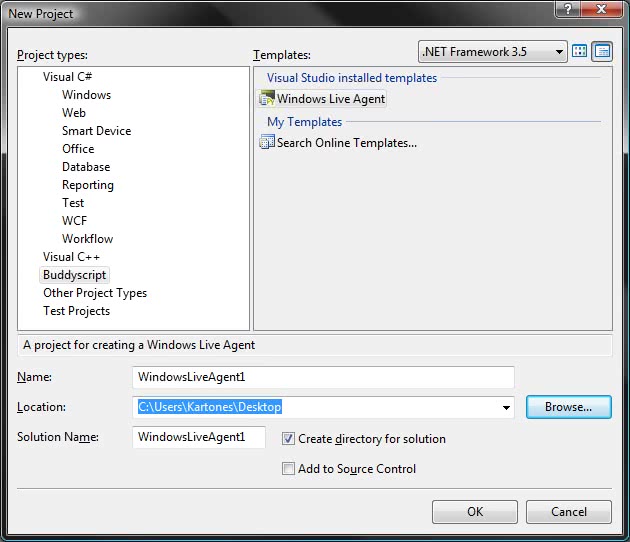
Let's start by creating a new project with the supplied template:
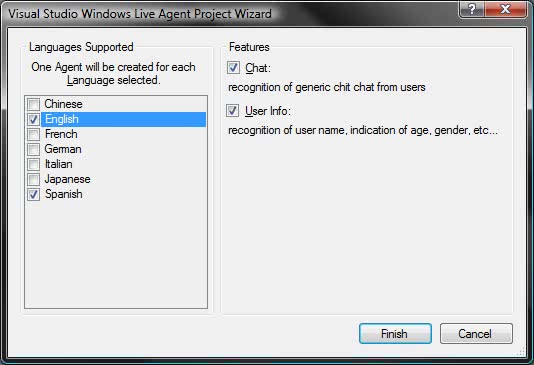
And choosing our desired languages and extra features (pre-made libraries for basic chatting). I want spanish and english with all language features (I can always disable unwanted patterns via code).
After creatin the files, here's how your project will look:
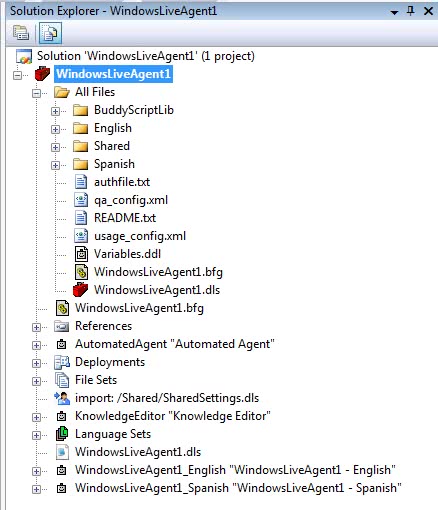
The Shared folder contains language-neutral files (this is where you should build your logic if you're developing a multi-language agent), while Spanish and English folders contain specific language code (this is where you should call language-neutral logic and present it in the desired language and formatting).
Note: BuddyScriptLib filder will be renamed as WLALib when 5.0 goes out of beta. You shouldn't touch the files inside it (if you need to modify anything, override the procedure/function instead).
Some initial cleaning I've done is this:
Delete the following files:
Modify and/or remove unwanted languages in this files:
Configure the following file:
Note: MSN account passwords are no longer encrypted in the bfg file.
And that's all, we've got a spanish + english agent, with all basic features, setup to launch in the Messenger cloud, with slight personalization and some initial cleaning performed.
In the next tutorial we will continue customizing the agent and adding one or two new features, like showing data from an RSS feed.