Title: Building a very basic Google Wave extension
Slug: building-a-very-basic-google-wave-extension
Date: 2009-10-20 16:43:00
Author: Kartones
Lang: en
Tags: Development, HTML, Javascript
Description: A guide on building a basic Google Wave extension.

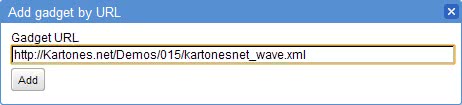
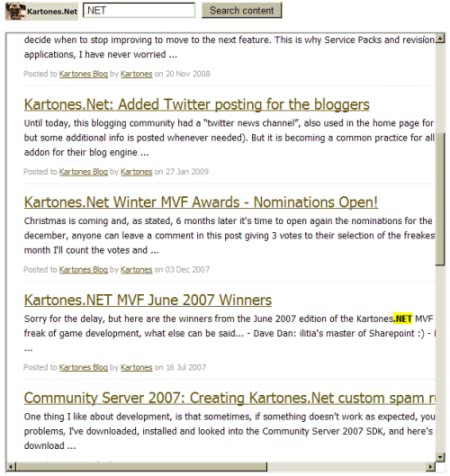
 <p>Alhough seems that all of us who have been invited recently to Google Wave have some limitations (can't invite others, don't have the "Extension Installer" wave...), we can still play a little with it and develop some wave extensions.</p>  <p>I've based my article in the <a href="http://code.google.com/apis/wave/extensions/gadgets/guide.html">official gadgets tutorial</a>. You can't create robots, but to get the feeling of how all works I prefered something very simple. I'm going to create a small extension to be able to search in the posts of <a href="https://kartones.net/">Kartones.Net</a> and list the results inside the wave (google names ‘wave' to a conversation thread).</p>  <p>An extension is just an XML file, containing two parts:</p>  <ol>   <li>XML nodes detailing all configuration options, name, default size, etcetera. </li>    <li>A special XML node containing the full HTML of the wave. </li> </ol>  <p>Yes, as you will have noticed this is a bit clumsy and not the best option to debug, but at least works (I suggest to build the basic HTML and Javascript first in an HTML file and then add the extension XML and rename it).</p>  <p>I'm not going to repeat what it's perfectly explained in the tutorials, so I'll just show what my extension contains:</p>  <p><font face="Courier New"><font color="#0000ff">&lt;</font><font color="#800000">?xml</font><font color="#ff0000"> version</font><font color="#0000ff">="1.0"</font><font color="#ff0000"> encoding</font><font color="#0000ff">="UTF-8"</font><font color="#ff0000"> ?</font><font color="#0000ff">&gt;</font></font><font color="#000000">      <br></font><font face="Courier New"><font color="#0000ff">&lt;</font><font color="#800000">Module</font><font color="#0000ff">&gt;</font></font><font color="#000000">      <br><font face="Courier New">  </font></font><font face="Courier New"><font color="#0000ff">&lt;</font><font color="#800000">ModulePrefs</font><font color="#ff0000"> title</font><font color="#0000ff">="Kartones.Net Wave"</font><font color="#ff0000"> height</font><font color="#0000ff">="50"&gt;</font></font><font color="#000000">      <br><font face="Courier New">    </font></font><font face="Courier New"><font color="#0000ff">&lt;</font><font color="#800000">Require</font><font color="#ff0000"> feature</font></font><font face="Courier New"><font color="#0000ff">="dynamic-height"/&gt;        <br>    &lt;</font><font color="#800000">Require</font><font color="#ff0000"> feature</font></font><font face="Courier New"><font color="#0000ff">="wave"/&gt;        <br>  &lt;/</font><font color="#800000">ModulePrefs</font><font color="#0000ff">&gt;</font></font><font color="#000000">      <br><font face="Courier New">  </font></font><font face="Courier New"><font color="#0000ff">&lt;</font><font color="#800000">Content</font><font color="#ff0000"> type</font><font color="#0000ff">="html"&gt;</font></font><font color="#000000">      <br><font face="Courier New">    </font></font><font color="#0000ff" face="Courier New">&lt;</font><font face="Courier New"><font color="#800000">![CDATA[        <br>        <br></font><font color="#ff0000">    ]]</font><font color="#0000ff">&gt;</font></font><font color="#000000">      <br><font face="Courier New">  </font></font><font face="Courier New"><font color="#0000ff">&lt;/</font><font color="#800000">Content</font><font color="#0000ff">&gt;</font></font><font color="#000000">      <br></font><font face="Courier New"><font color="#0000ff">&lt;/</font><font color="#800000">Module</font><font color="#0000ff">&gt;</font></font><font color="#000000"></font></p>  <p>The <font face="Courier New"><font color="#0000ff">&lt;</font><font color="#800000">Content&gt;</font></font> node will contain the HTML and javascript, we will store data inside the wave (<font face="Courier New"><font color="#0000ff">&lt;</font><font color="#800000">Require</font><font color="#ff0000"> feature</font></font><font face="Courier New"><font color="#0000ff">="wave"/&gt;</font></font>) and the extension will change its height when needed (<font face="Courier New"><font color="#0000ff">&lt;</font><font color="#800000">Require</font><font color="#ff0000"> feature</font></font><font face="Courier New"><font color="#0000ff">="dynamic-height"/&gt;</font></font>).</p>  <p> </p>  <p>Our HTML will be quite simple:</p>  <p><font face="Courier New"><font color="#0000ff">&lt;</font><font color="#800000">p</font><font color="#0000ff">&gt;</font></font><font color="#000000">      <br><font face="Courier New">      </font></font><font face="Courier New"><font color="#0000ff">&lt;</font><font color="#800000">img</font><font color="#ff0000"> src</font><font color="#0000ff">="https://kartones.net/images/mb_kartonesnet.gif"</font><font color="#ff0000"> alt</font><font color="#0000ff">="Kartones.Net"</font><font color="#ff0000"> title</font><font color="#0000ff">="Kartones.Net"</font></font><font color="#ff0000">      <br><font face="Courier New">        style</font></font><font face="Courier New"><font color="#0000ff">="vertical-align:middle"</font><font color="#ff0000"> </font></font><font face="Courier New"><font color="#0000ff">/&gt;        <br>      &lt;</font><font color="#800000">input</font><font color="#ff0000"> type</font><font color="#0000ff">="text"</font><font color="#ff0000"> id</font><font color="#0000ff">="searchText"</font><font color="#ff0000"> size</font><font color="#0000ff">="20"</font><font color="#ff0000"> </font></font><font face="Courier New"><font color="#0000ff">/&gt;        <br>      &lt;</font><font color="#800000">input</font><font color="#ff0000"> type</font><font color="#0000ff">=button</font><font color="#ff0000"> value</font><font color="#0000ff">="Search content"</font><font color="#ff0000"> id</font><font color="#0000ff">="searchButton"</font><font color="#ff0000"> onClick</font><font color="#0000ff">="SearchButtonClicked()"</font><font color="#ff0000"> </font></font><font face="Courier New"><font color="#0000ff">/&gt;        <br>       <br>      &lt;</font><font color="#800000">br</font><font color="#ff0000"> </font></font><font face="Courier New"><font color="#0000ff">/&gt;        <br>      &lt;</font><font color="#800000">div</font><font color="#ff0000"> id</font><font color="#0000ff">="searchResultsContainer"&gt;</font><font color="#000000">&amp;bnsp;</font><font color="#0000ff">&lt;/</font><font color="#800000">div</font><font color="#0000ff">&gt;</font></font><font color="#000000">      <br></font><font face="Courier New"><font color="#0000ff">&lt;/</font><font color="#800000">p</font><font color="#0000ff">&gt;</font></font><font color="#000000"></font></p>  <p> </p>  <p>And the JS a bit more but nothing too complex:</p>  <p><font face="Courier New"><font color="#000000">&lt;script type</font><font color="#0000ff">=</font><font color="#808080">"text/javascript"</font></font><font face="Courier New"><font color="#000000">&gt;        <br>        <br>    </font><font color="#0000ff">function </font></font><font face="Courier New"><font color="#000000">SearchButtonClicked()  <br>    {       <br>      </font><font color="#0000ff">var </font><font color="#000000">currentSearch </font><font color="#0000ff">= </font><font color="#000000">wave.getState().</font><font color="#0000ff">get</font><font color="#000000">(</font><font color="#808080">'search'</font><font color="#000000">, </font><font color="#808080">''</font><font color="#000000">)</font></font><font face="Courier New"><font color="#0000ff">;        <br>      var </font><font color="#000000">new_search </font><font color="#0000ff">= document</font><font color="#000000">.getElementById(</font><font color="#808080">'searchText'</font><font color="#000000">).</font></font><font face="Courier New"><font color="#0000ff">value;        <br>       <br>      if </font><font color="#000000">(new_search !</font><font color="#0000ff">= </font><font color="#808080">'' </font><font color="#000000">&amp;&amp; new_search !</font><font color="#0000ff">= </font></font><font face="Courier New"><font color="#000000">currentSearch)        <br>      {       <br>        <b>wave.getState().submitDelta({</b></font><b><font color="#808080">'search'</font><font color="#000000">: new_search})</font></b></font><font color="#0000ff" face="Courier New"><b>;        <br></b>      </font><font face="Courier New"><font color="#000000">}        <br>    }         <br>   <br>        <br>    </font><font color="#0000ff">function </font></font><font face="Courier New"><font color="#000000">StateUpdated()  <br>    {         <br>      </font><b><font color="#0000ff">var </font><font color="#000000">currentSearch </font><font color="#0000ff">= </font><font color="#000000">wave.getState().</font><font color="#0000ff">get</font><font color="#000000">(</font><font color="#808080">'search'</font><font color="#000000">, </font><font color="#808080">''</font><font color="#000000">)</font></b></font><font face="Courier New"><font color="#0000ff"><b>;</b>         <br>     <br>      if </font><font color="#000000">(currentSearch !</font><font color="#0000ff">= null </font><font color="#000000">&amp;&amp; currentSearch !</font><font color="#0000ff">= </font><font color="#808080">''</font></font><font face="Courier New"><font color="#000000">)        <br>      {         <br>        </font><font color="#0000ff">if</font><font color="#000000">(</font><font color="#0000ff">document</font></font><font face="Courier New"><font color="#000000">.all)        <br>        {         <br>          </font><font color="#0000ff">var </font><font color="#000000">resultsDiv </font><font color="#0000ff">= document</font><font color="#000000">.all(</font><font color="#808080">'searchResultsContainer'</font><font color="#000000">)</font></font><font color="#0000ff" face="Courier New">;      <br>        </font><font color="#000000" face="Courier New">}      <br>        </font><font color="#0000ff" face="Courier New">else      <br>        </font><font face="Courier New"><font color="#000000">{        <br>          </font><font color="#0000ff">var </font><font color="#000000">resultsDiv </font><font color="#0000ff">= document</font><font color="#000000">.getElementById(</font><font color="#808080">'searchResultsContainer'</font><font color="#000000">)</font></font><font color="#0000ff" face="Courier New">;      <br>        </font><font face="Courier New"><font color="#000000">}        <br>      <br>        resultsDiv.innerHTML </font><font color="#0000ff">= </font><font color="#808080">"&lt;iframe id='resultsFrame' width='600' height='600' src='...your-url-goes-here-" </font><font color="#000000">+ currentSearch + </font><font color="#808080">"'&gt;&lt;/iframe&gt;"</font></font><font color="#0000ff" face="Courier New">;      <br>      <br>        </font><font face="Courier New"><font color="#006400">// Tells gadget to resize itself        <br>        </font><b><font color="#000000">gadgets.</font><font color="#0000ff">window</font><font color="#000000">.adjustHeight()</font></b></font><font color="#0000ff" face="Courier New"><b>;</b>       <br>      </font><font face="Courier New"><font color="#000000">}        <br>    }         <br>        <br>    </font><font color="#0000ff">function </font></font><font face="Courier New"><font color="#000000">WaveInit()  <br>    {         <br>      </font><font color="#0000ff">if </font></font><font color="#000000" face="Courier New">(<b>wave &amp;&amp; wave.isInWaveContainer()</b>)  <br>      {       <br><b>        wave.setStateCallback(StateUpdated)</b></font><font color="#0000ff" face="Courier New"><b>;</b>       <br>      </font><font color="#000000" face="Courier New">}      <br>    }       <br>      <br>       <br>    </font><font face="Courier New"><font color="#006400">// Initialization code        <br>    </font><font color="#000000"><b>gadgets.util.registerOnLoadHandler(WaveInit)</b></font></font><font face="Courier New"><font color="#0000ff"><b>;</b>         <br>        <br></font><font color="#000000">&lt;/script&gt;</font></font></p>  <p> </p>  <p>Basically, if we're inside a wave, we setup a callback handler for state changes (<font face="Courier New"><font color="#000000">SearchButtonClicked</font></font>() sends state changes, that are nothing else than variables) and <font face="Courier New"><font color="#000000">StateUpdated()</font></font> gets called when we input something and click on the Search Content button (to avoid too many calls, if we haven't wrote anything or is the same as was previously, no data is sent).</p>  <p>We use an iframe to render the search results, and we tell our gadget to update its height (to the iframe's one in this example).</p>  <p> </p>  <p>This is the final result (with a search performed):</p>  <p><img title="Screenshot" alt="Screenshot" src="https://images.kartones.net/posts/kartonesblog/kartonesnet_wave_01.jpg"></p>  <p>If you are on a wave with multiple users, you can all search. Just remember that as this state is shared between all participants of the wave, only one search can be active at once (last value will override previous one).</p>  <p> </p>  <p>You can test this extension inside Google Wave by adding this gadget url: <code>http://kartones.net/femos/015/kartonesnet_wave.xml</code> (url no longer working)<br><img title="Gadget URL" alt="Gadget URL" src="https://images.kartones.net/posts/kartonesblog/kartonesnet_wave_02.jpg"></p>